

What Reports Should I Pull From My Workshop Management System?
Pull four reports every week. Your sales summary, with labour and parts as separate lines and the gross profit on each. Your technician productivity and efficiency reports, for each technician and for the team. Your average repair order and daily sales. And a new customer report that shows where every new customer came from. Then use the labour figures to work out your effective labour rate, because your software almost certainly won't do it for you.
If you've had the software for years and never opened the reports menu, you're not alone. Nobody showed you where to look, and you've been busy doing the work.
The reports are the same whether you run an auto repair shop, a mechanics workshop, an automotive workshop or a garage, and whether you call it workshop management software or shop management software. Pulling them is the easy part. The value comes from reading them every week and doing something about what they show you.
Why aren't my reports telling me anything useful?
Before we get to which reports, there's a reason a lot of owners give up on them. They print one, the numbers look wrong, and they stop trusting it.
The software isn't the problem. As I've said before, the data on those reports "is only as good as the information that's being put in."
The biggest gap is time. If your technicians don't clock on and off every job, your productivity and efficiency reports are built on guesses. And when technicians write their times down by hand, the rule is simple: "No guessing, because when we guess, we always round down. It's just human nature." The time from picking up the keys and job card to handing them back to the service advisor is real time, and if it never gets recorded it never gets sold.
I was speaking with a shop owner who was turning over $100,000 a month and still not tracking time properly. They knew they were leaving money on the table. They were worried that asking a long-serving team to be on the clock all day would blow up in their faces. A business that goes years without time clocking has probably left hundreds of thousands of dollars in labour profit uncharged. The good news is that most teams have time clocking as a habit within four to five weeks, although it's a lot harder to bring in years down the track than in your first year.
The second gap is running the whole business through an accounting package. Your workshop management system is where the jobs, the hours, the parts and the customers live. Your accounting software, usually connected to it, is where your profit and loss and balance sheet live. You need reports from both, and your bookkeeping should be up to date at least weekly so the numbers are right whenever you look.
Which reports should I pull, and what am I looking for?
1. The sales summary, with labour and parts split. This is your starting point. Look at labour sales and parts sales as two lines, and the gross profit on each. The benchmark we use is gross profit of 58% to 62% across the whole business. Dean breaks that into two parts. Labour gross profit should sit around 70% to 74%, and parts gross profit around 48% to 52%. If the overall figure is short, one of those two lines is the reason.
2. Technician productivity and efficiency, for each technician. Productivity is the hours sold against the hours available to sell. Efficiency is the time a job took against the time you set for it. Any decent mechanic-specific software will produce both with a couple of clicks. Read them one technician at a time, then ask what decisions you need to make and what conversations you need to have. If your software can't produce these reports, that's a strong sign it's time to change software.
3. Average repair order and daily sales. Your average repair order, which many of you call average job value or average invoice, tells you whether the work your technicians find is being sold at the front counter. Daily sales tell you whether the week is on track while there's still time to do something about it.
Laura Moore runs M-Developments in Queenstown, New Zealand. The business was carrying debt, and she'd decided not to "let the fact that we own a business control how we want our life to be." She got strict on the budget, paid the debt off with Profit First and learned to read her numbers. "By really learning to know our numbers, it's meant that we can pretty much do anything. We know where the business is at at any stage." It started with questions like "Was our labour rate right?" and it delivered their highest profit result ever. Watch Laura's story.
4. New customers, and where they came from. Every new customer should fill in a new customer form that asks one question: "How did you find out about us?" Then cross-reference it every week against the enquiries that came through your website and social media, to see if anyone slipped through. Some of our clients have new customers fill it in on an iPad when they arrive. If you've run radio ads for a year, tried hard to track them and can't trace a single customer, it hasn't worked, so move on.
The number your software won't give you. Your effective labour rate (or effective labor rate, if you're in the US) is the money you actually receive for every hour your technicians have available to sell. I'm not aware of any workshop software that calculates it for you, so you work it out from the reports above. Dean says it well: "Your accountant can't see the gap. Your software doesn't flag it." We've written a full guide to calculating your effective labour rate.
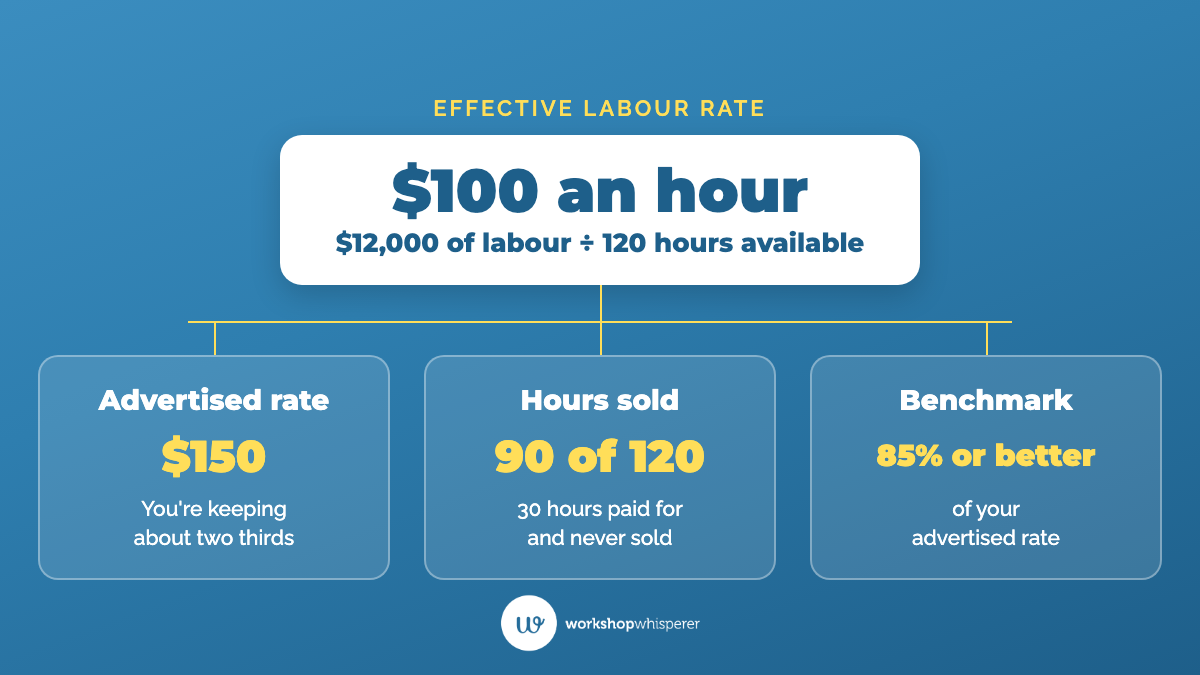
A worked example. These numbers are mine, made up to show how the reports talk to each other. Say last week's sales summary shows $12,000 in labour and $9,000 in parts, and those parts cost you $5,400. Your parts gross profit is $3,600, or 40%. At 50%, the same parts would have sold for $10,800. That's $1,800 more gross profit in one week, or about $93,600 over a year.
Now the productivity report. Three technicians had 120 hours available and sold 90 of them, so the team is 75% productive. Divide your $12,000 of labour by the 120 hours available and your effective labour rate is $100 an hour. If your advertised rate is $150, you're keeping about two thirds of it, and the benchmark we use is 85% of your advertised rate or better. The productivity report shows you why: 30 hours you paid your technicians for and never sold. So one week's reports have handed you two jobs. Review your parts pricing, and find out where those 30 hours went.
Who should pull the reports, and what do I do with them?
Your accountant looks backwards. Turnover, gross profit and net profit are what I call lag measures. By the time they show up, the work that created them is done. Your management system holds the lead measures, the things you can still change this week: hours sold, efficiency, average repair order, new customers.
Hand the gathering to your service advisor. If you have a service advisor, or a service writer or service adviser depending on where you are, gathering the daily numbers should be their job, written into a procedure. Daily sales, average repair order, productivity, efficiency and gross profit dollars per hour. Once it's a procedure, you can train it and hand it over, and that's how you stop being the only person who knows how the business is going. If you look after the marketing yourself, tracking where new customers come from stays with you.
Read them like a scan tool. Dean uses a comparison every mechanic will recognise. When a car comes in with a warning light, you don't drive it harder and hope the light goes off. You plug in the scan tool, find the fault code, read the range and fix the source. Your reports are the scan tool. One of our members, a shop turning over around $800,000 a year, came to us convinced they needed more customers. When we read the numbers, the fault was the labour rate. They were charging $30 an hour below where a shop their size should sit. They raised the rate, and the next quarter they made more money on the same number of jobs. If that's you, our advice is always the same: don't announce a rate rise to your customers, do it. We track 16 dials with our members every week, but the four reports above are ones every owner can pull this Friday.
Then act on what you see. Plenty of owners know they should watch these numbers. What usually goes missing is the change once a report shows them something. If a technician's productivity is low three weeks running, sit down with them and talk it through. If parts gross profit is under benchmark, review your pricing that week. If your shop turns over more than $50,000 a month, The Engine Room is where we help you turn those numbers into decisions every week, with one-on-one coaching on demand from a business coach who has run an auto repair shop.
Watch this before you open the reports menu. In about eight minutes on the podcast, I explain lead and lag measures, which numbers your service advisor should gather every day, and the one question every new customer should answer.
Questions auto repair shop owners ask about workshop management reports
What's the difference between my workshop management system and my accounting software?
Your workshop management system runs the shop: bookings, job cards, invoices, parts, time clocking and your customer database. Your accounting software holds your profit and loss and balance sheet. Most shops connect the two. An accounting package on its own can't manage your stock properly or easily search your customer database, which is why it doesn't cut it as a management system.
Why doesn't my software show my effective labour rate?
Most systems don't calculate it. You work it out yourself: your labour dollars for the week divided by the hours your technicians had available to sell. Then compare it with your advertised rate. You need two numbers and a calculator.
How often should I pull these reports?
Weekly, at a set time, with the daily figures gathered by your service advisor as part of their procedure. Your accountant's figures tell you what has already happened. A weekly report gives you time to change it.
My productivity report looks wrong. What's going on?
Usually the time going in is wrong. Check that every technician clocks on and off every job, from picking up the keys to handing them back. If your software has time clocking and it isn't turned on, turn it on. If it doesn't have it, have technicians write exact times on the job card from their watch until you upgrade.
Do I need new software to get these reports?
Not always. Many owners already have the reports and have never been shown where they are. But if your software can't produce productivity and efficiency reports for each technician, or can't record time against jobs, it's time to change.
Where to start tonight
Open your workshop management system and find last week's four reports: the sales summary, technician productivity and efficiency, average repair order, and new customers. Write the numbers on one page. Next to each one, write whether you trust it. Wherever a report is missing or the numbers look wrong, that's your first fix, and it's usually the time clocking.
Related questions:
See what changes for the people who do this work. On our Our Clients page, auto repair shop owners, named and on camera, tell you what actually changed in their shops and their numbers.
More on this topic: all Software articles.
Whenever you're ready, here's how we can help.
- Not ready to spend anything yet? Start free with Shop Talk, a 30-day reset for auto repair shop owners on our YouTube channel, and our free resources for auto repair shop owners.
- Running an auto repair shop under $50,000 a month? Auto Superstars Academy builds the foundations, with one-on-one coaching on demand from a business coach who is a current or former auto repair shop owner.
- Over $50,000 a month? The Engine Room changes how the whole business runs, from your numbers to your team, delivered online with one-on-one coaching on demand.