
What Should I Look For in Workshop Management Software?
Look for a program built for a mechanics workshop, not a general accounting package. It should clock your technicians on all day, print productivity and efficiency reports at the push of a button, hold your parts markups, run paperless job cards, send service reminders and text messages, and connect to your accounting program and your parts suppliers. Then look at the people behind it: will they move your data across, train your team and answer the phone when something breaks?
If you've been putting this decision off for a year or two, you're in good company. Changing systems feels enormous, and putting it off is almost never because you don't care.
Whether you call it workshop management software, shop management software or your invoicing program, and whether you run an automotive workshop or a garage, I judge every system by one question: does it capture every minute your team works and get it onto the invoice?
Why isn't my accounting program enough?
Scott, a listener from Queensland, sent us a question I hear all the time. He was doing his invoices and his books in an accounting program, and he knew he should be using something built for his shop. He was worried about the time it would take to learn a new program, train the team, and whether his accountant would like it.
Xero, MYOB and QuickBooks are fantastic accounting programs. They aren't built to run an auto repair shop from. They won't look after your stock properly, hold your customer and car database, pull up a vehicle's repair history quickly, or clock your technicians' time.
The good news for Scott was that he didn't have to give anything up. A mechanic-specific program connects to the accounting program you already use, so the books carry on as they are and the workshop side gets the tools it's been missing.
As for the accountant, nothing changes at their end. If yours is steering you to stay on an accounting program only because it's simpler for them, it's time for another accountant. You pay them to make your business better, not to make their job easier.
What should workshop management software actually do?
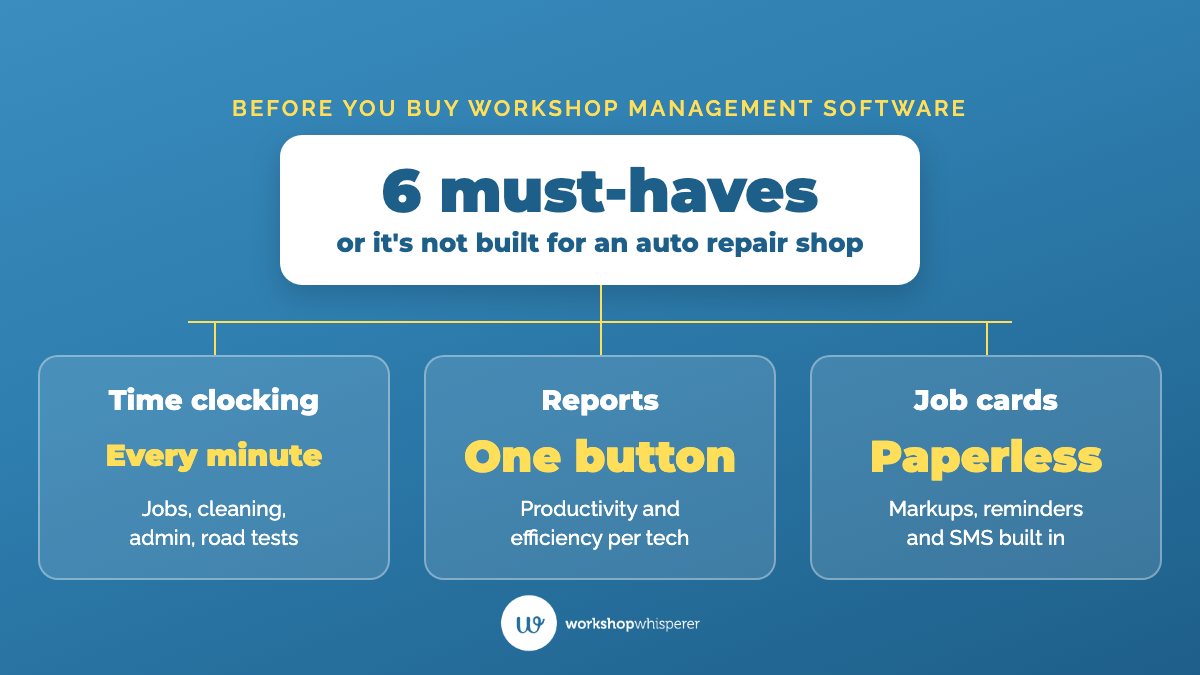
When I look at a shop's system, I'm checking for six things.
- Continuous time clocking. Your technicians clock onto a job, then onto cleaning, admin or a road test, so every minute of the day is accounted for. Clocking only the job itself isn't enough, because the minutes between jobs are where the money leaks.
- Productivity and efficiency reports at a button. Productivity is hours sold against hours available. Efficiency is the time a job took against the time you set for it. If your software can't produce those two reports for each technician and for the whole team, that's a strong sign it's time to upgrade.
- Your markups built in. Set your desired markup for each part and service in the system, so it shows whether a job will hit your margin before you invoice it. Your service advisor (or service writer, or service adviser) shouldn't be working out margins in their head at the front counter.
- Paperless job cards. Job cards on a tablet, stored in the system. When a customer comes back three months later asking what was done, you click a few buttons rather than digging through a box in the archives. If your program can't run paperless, you're not on one of the better programs designed for the industry.
- Automatic service reminders and text messages. At the end of the invoice, tick a box and the reminder goes out in six or twelve months. Built-in SMS lets you fill a quiet afternoon by messaging your customer list.
- Connections to everything else. Your accounting program, your parts suppliers and your repair and servicing data. On repair data, check with your parts supplier and any association you belong to, because you may already have free or cheaper access.
What capturing those minutes is worth. A few extra minutes an hour on every job card adds up to real money across a year, and I've worked through the numbers here.
One warning on reports. They're only as good as the information that goes in. If your team guesses their times, they'll round down, because that's human nature, and those minutes never reach the invoice.
Kirsty Gardner runs Ja-Max Industries in Blackwater, Queensland, and their business grew from a mobile operation to 14 staff. "I think we just grew too quick and we never had our SOPs and that in place," she says, "and we weren't really tracking productivity and stuff like that." In The Engine Room they put SOPs and a team handbook in place alongside better software, and now they track productivity and know their numbers. Kirsty works from home full time, 200 kilometres from the shop. "I have eyes and ears over that premises those 12 hours a day basically," she says. "If we wanted to go away for a week, there wouldn't be an issue."
How do I switch without it turning into a nightmare?
Most owners I talk to know their system is holding them back. Every couple of years they'll book a demo of a new one, then never change over, and the problem keeps compounding.
Set a deadline. Ask yourself: if I had to make this decision, how would I make it, and how long would I give myself? Then look back at how long similar decisions have taken you. If the honest answer is two years, you've probably got a procrastination problem rather than a software problem.
Lean on the migration help. The fear of moving your data is mostly unfounded these days. A good provider will pull your customer and vehicle history out of your old program where it can, set you up on the new one and train your team. Ask what they'll migrate, how long it takes, and whether their help desk answers when you call.
Expect pushback on time clocking, and lead through it. Some technicians will tell you it's like Big Brother, or ask why you don't trust them. You're paying them for 38 hours a week, and as the owner it's your right to see where those hours go. In a dealership it's standard practice and nobody questions it. Your younger team members probably aren't afraid of the technology at all. Most teams have it as a habit in around four to five weeks.
Know what software can't do. All the fancy software programs in the world won't change your outcome if you're too busy doing everything yourself to read the reports and coach your team. The system gives you the numbers, and you still have to sit down with them and lead your team. If your shop turns over more than $50,000 a month, The Engine Room is where we help you do that, changing how the whole business runs, from your numbers to your team, with one-on-one coaching on demand from a business coach who has run an auto repair shop.
Watch the first eight minutes of this 19-minute training before you book a software demo. The first mistake I cover is starting out without mechanic-specific software, and why an owner who never turned on time clocking has probably left six figures of labour profit uncharged.
Questions auto repair shop owners ask about workshop management software
Do I need mechanic-specific software if I already use Xero or MYOB?
Yes. Keep your accounting program for the books and connect a mechanic-specific program to it for invoicing, stock, your customer database, time clocking and reporting. Nothing changes at your accountant's end.
Which workshop management software do you recommend?
The right one depends on your country and the size of your shop, so test any program against the six things above rather than a sales pitch. If you'd like to hear what other owners in your country use, ask in our free Facebook group, Your Profitable Auto Repair Shop, where thousands of auto repair shop owners share what works.
What if my technicians refuse to clock on all day?
Set the expectation, explain why, and follow through. A technician who won't be open about the hours you pay them for is usually telling you something about their performance. As I say to owners, how we do one thing is how we do everything.
How long does it take to switch software?
The setup and data move depends on the provider, so ask them before you sign. Getting your team into the habit of continuous time clocking usually takes around four to five weeks.
Will my software tell me my effective labour rate?
Don't count on it, because many programs don't calculate it. You can work it out yourself from two figures: your total labour sales for a week, divided by the hours your technicians had available to sell that week.
Where to start tonight
Open your system and try to print last week's productivity and efficiency report for each technician. If you can, read it and ask what it's telling you about each person on the floor. If you can't, because the report doesn't exist, the time clocking is switched off or your team doesn't use it, you've found your answer. Then score your current program against the six things above, and write down the date you'll make the decision by.
Related questions:
See what changes for the people who do this work. On our Our Clients page, auto repair shop owners, named and on camera, tell you what actually changed in their shops and their numbers.
More on this topic: all Software articles.
Whenever you're ready, here's how we can help.
- Not ready to spend anything yet? Start free with Shop Talk, a 30-day reset for auto repair shop owners on our YouTube channel, and our free resources for auto repair shop owners.
- Running an auto repair shop under $50,000 a month? Auto Superstars Academy builds the foundations, with one-on-one coaching on demand from a business coach who is a current or former auto repair shop owner.
- Over $50,000 a month? The Engine Room changes how the whole business runs, from your numbers to your team, delivered online with one-on-one coaching on demand.